We Source the Parts
Tell us what your machine needs and we'll handle procurement. We source compatible, quality components and bring them to the appointment ready to install. No back-and-forth, no compatibility guesswork.
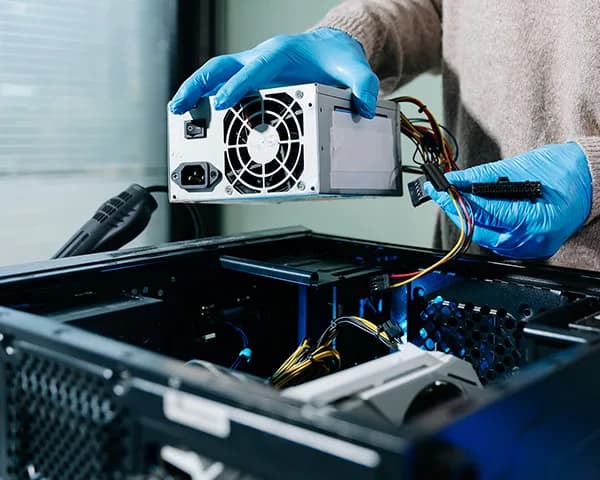

On-site hardware upgrades and component replacement for Miami businesses and professionals. No drop-offs, no waiting: we come to your office or home and get your machine performing the way it should.
On-site service · Miami-Dade · Hablamos Español
When the hardware is the problem
Before assuming your machine needs to be replaced, it's worth knowing what's actually causing the issue. Outdated RAM, a failing drive, a clogged cooling system, or an unstable power supply can make a perfectly capable computer feel completely unusable, and every one of those is fixable. We come to your location, identify the hardware bottleneck, and replace or upgrade what's needed on the spot.
These are diagnostic signals, not guesses. The visit confirms the root cause before work begins.
Your machine slows to a crawl with too many tabs or applications open. RAM is one of the most cost-effective upgrades available, and one of the most commonly overlooked.
Unusually slow file access, long boot times, or strange noises are early signs of drive trouble. The window to act safely is limited.
Random power-offs, instability under load, or a machine that won't stay on are classic signs of a failing power supply.
A machine that runs hot, slows down under load, or shuts off without warning is protecting itself from heat damage, and telling you something needs attention.
Crashes, freezes, and errors that don't point to software are often traced back to the motherboard.
What we handle
Not enough memory is one of the most common reasons a computer slows down under normal workloads. We assess your current configuration, confirm compatibility, and install the right upgrade for your machine, on-site, same visit.
A failing or outdated hard drive kills performance and puts your data at risk. We replace HDDs with fast SSDs or swap out failing drives, and handle data migration to the new drive so you don't lose anything in the process.
Unexpected shutdowns, instability under load, or a machine that simply won't power on are often PSU failures in disguise. We diagnose the power system and replace the unit on-site when that's the root cause.
Overheating leads to throttling, instability, and long-term hardware damage. We clean, reseat, or replace cooling components: fans, heatsinks, and thermal paste: to bring temperatures back to safe operating levels.
When the motherboard is the issue, most repair shops say replace the whole machine. We assess whether a board swap makes financial sense and, when it does, handle the replacement on-site so your data, peripherals, and setup stay intact.
Flexible parts sourcing
Hardware upgrades don't always require you to source the parts yourself. We can handle procurement, or work with components you've already purchased, whichever approach fits your timeline and budget.
Tell us what your machine needs and we'll handle procurement. We source compatible, quality components and bring them to the appointment ready to install. No back-and-forth, no compatibility guesswork.
Bought the RAM stick, SSD, or replacement component yourself? We'll verify compatibility on-site and handle the installation professionally. If something isn't right, we'll catch it before it causes a problem.
Who books this service
Hardware upgrades and repairs make the most sense when the machine is worth keeping but the components are holding it back. These are the situations we see most often:
A team of 5 running on 4-year-old desktops with spinning hard drives and 8GB of RAM. Replacing machines costs thousands. Upgrading them costs a fraction of that, and can buy years of reliable performance.
A professional whose laptop throttles under load, runs hot constantly, and shuts off without warning. Nine times out of ten, a cooling service or thermal paste replacement solves it completely.
Random shutdowns, instability under load, or a machine that powers on briefly and dies. Classic PSU behavior, and a straightforward fix when diagnosed correctly.
Clicking, grinding, or unusually slow file access are early signs of drive failure. The window to replace the drive and migrate data safely is limited. The sooner it's addressed, the better the outcome.

Describe what your machine is doing, or not doing. We'll help you determine if hardware is likely the issue before scheduling a visit.

We come to your location and run a hardware assessment to identify the failing or underperforming component. No guesswork: we confirm the problem before recommending a fix.

We walk you through what needs to be replaced, where the parts are coming from, and the total cost. Work begins only after you approve.

We perform the replacement or upgrade at your location. No drop-off, no waiting days for a callback: the job gets done in the same visit whenever possible.
Hardware service is priced in two parts: the on-site visit and the components themselves. You'll know both numbers before any work begins.
Most hardware upgrades cost significantly less than replacing a machine, and take a fraction of the time.
The visit fee covers travel, diagnosis, and installation labor. Quoted based on the scope of work: simple upgrades like RAM and SSD installs are straightforward; complex replacements like motherboards are quoted accordingly.
If we source the parts, you pay cost plus a transparent markup, with no inflated prices. If you supply the parts, you only pay for labor. Either way, you see the numbers before we start.
No upfront payment required. All pricing approved on-site before work begins.
That's exactly what the on-site assessment is for. We'll look at the machine, tell you what's causing the issue, and give you an honest answer on whether a repair or upgrade makes financial sense, or whether replacement is the smarter move. No pressure either way.
The more detail you give us, the better we can prepare for the visit.
We respond within a few hours during business hours. For urgent situations, calling or texting is faster.
We'd rather talk you out of a repair that doesn't make sense than charge you for one that won't solve the problem.
Prefer a faster response? Email info@miamitechemergency.com or call (305) 873-0480.


We provide on-site computer repair across Miami-Dade and selected Broward cities, with availability confirmed by schedule, distance, and service type.
Miami-Dade
 BrickellDowntown MiamiWynwoodCoral GablesDoralKendallCoconut GroveMiami BeachNorth MiamiMiami LakesMiami SpringsHialeahWestchesterAventuraSunny Isles BeachBal HarbourSurfsideBay Harbor IslandsPinecrestCutler BayHomesteadMedleySweetwaterEl Portal
Key Broward cities
Fort LauderdaleHollywoodPembroke PinesMiramarDaviePlantationWestonSunriseCoral SpringsNearby neighborhoods may also be available. If you're not sure whether your location is covered, call us and we'll confirm the best option for your area.
Call us to check availability











 Chat with us on WhatsApp
 Call us at (305) 873-0480
 Text us at (305) 873-0480